
原帖发布于
【How to build motion design studio with Opus 5.5 ( Full-course ) 】
Most people who try motion design with Opus 5.5 end up with the same video: centered text on a gradient, everything fading in, a logo at the end.
They don't give it a reference, don't give it a render engine, don't ask it to look at its own frames.
This is the 12-step course that turns that mess into a repeatable studio pipeline. The prompt is 10% of the video. The other 90% is the harness.
Follow my Substack to get fresh AI alpha: movez.substack.com
On September 22, 2026 Anthropic shipped Claude Opus 5.5.
Within hours the timeline filled with showreels, launch videos, music videos and five-minute history films, all of them rendered from code.
Captions said "one prompt". Replies said "motion designers are cooked".
Both are half true. Some clips really came from a 30-word prompt.
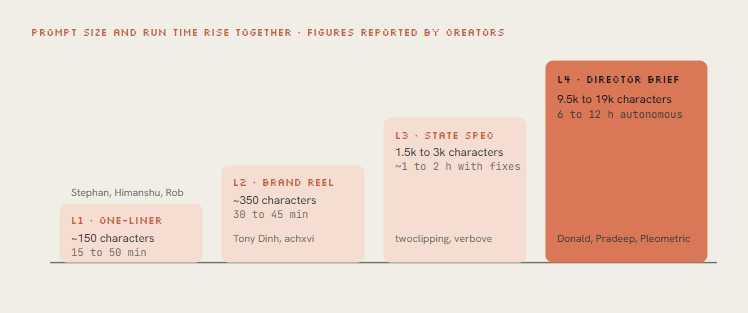
Others came from a 9,500-character director's brief, a folder of skills, two API keys and a 12-hour autonomous run.
Thariq from the Claude Code team summed up the gap in one line: the post says one-shot, the prompt is 10k characters with skills, examples, keys.
This course shows you both ends and everything in between.
You'll read every one of the 9 posts that defined the trend, copy the prompt pattern each one used, and then build the engine yourself.
A seek(t) renderer, closed-form springs, a beat grid, synthesized sound, and a critique loop that makes Opus fix its own frames.
• Part 1 · What is actually happening
01. Pixels - model writes a program, not a video
Opus 5.5 takes text and images in and puts text out. It cannot emit an MP4. Every video in this trend is a program that Opus wrote, and something else turned that program into frames.
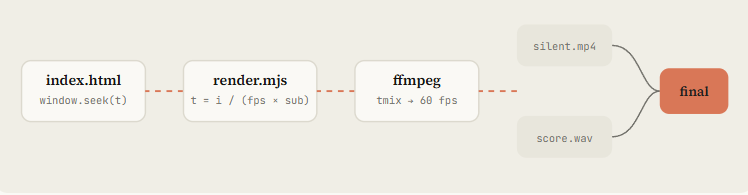
The core trick is determinism. Opus writes a single function, draw(t) or seek(t), that paints the exact frame for any moment in time.
A headless browser calls it 900 times for 15 seconds at 60 fps, screenshots each frame, and ffmpeg stitches them.
Nothing depends on a timer, so the render is identical every run and a change is a one-line edit plus a re-render.
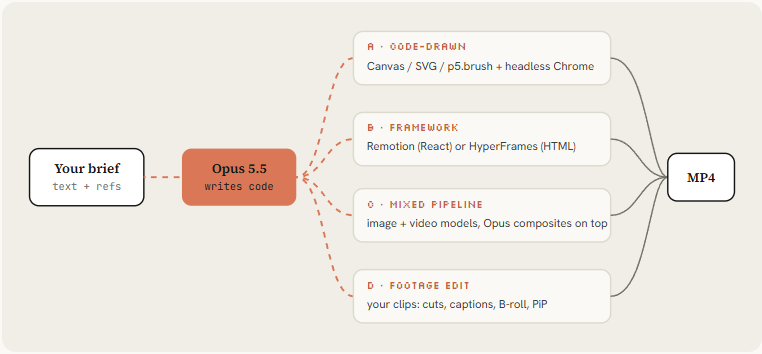
Tommy Rossi dug into the one-shot output and found Opus prefers route A with zero dependencies: one index.html, a seek function called through eval, Playwright capturing frame by frame, ffmpeg encoding.
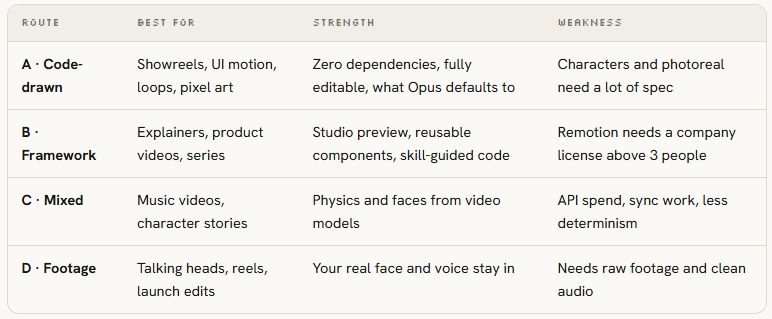
It skipped Remotion and HyperFrames even when available. If you want a framework, say so explicitly.
02. Setup - install the studio in 10 minutes
The chat app can write an animation, but only Claude Code (or any agent with a shell) can render it, listen to it and look at its own frames.
That feedback loop is the whole difference between the "mid" first try people complain about and the viral ones.
Then drop a house-rules file in the project root. Claude Code reads CLAUDE.md on every run, so these rules apply to every video you make here without repeating them.
Opus 5.5 defaults to medium effort and always thinks before answering. Every viral one-shot in the list ran on xhigh or max.
Use medium for small fixes and re-renders, xhigh for new films, max when the first 3 seconds have to carry a launch.
• Part 2 · Prompting like a director
03. One-liner - showreel prompt and why it works
Four of the nine posts used the same sentence. It's worth understanding why a single line produced 15 seconds of camera moves, kinetic type and audio.
• "showreel for a résumé" sets a genre with known rules: fast cuts, a new technique every shot, the best work first. Opus already knows what a reel looks like.
• "what an incredible motion designer you are" makes the model the subject, so it shows techniques instead of explaining a product. No content to get wrong.
• "15-second" is short enough to finish in one pass and long enough for 6 to 8 shots.
• "go all out" works as an effort multiplier on top of xhigh or max.
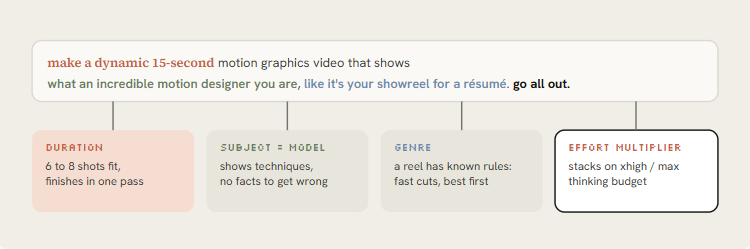
The original 15-second résumé reel on Max effort. The source of the prompt. Put it directly under the anatomy diagram.
Same prompt on xhigh, one-shot including audio. Shows xhigh is enough, and that the sound was not added in post.
The weakness: the athemeroy dataset calls it "brief contagion". Hundreds of identical prompts produced reels that rhyme with each other. Use it to test your setup, then move on. Variants that shipped and worked:
A one-liner tests the engine. It never tests the idea, because it doesn't contain one.
04. Brand - point the reel at your product
Tony Dinh's post is the most useful for anyone selling something. He paid over $1,000 for a similar launch video a year ago; this took under 30 minutes.
Three extra lines did it: the product URL, "use actual product screenshot, logo, assets", and "must have music". Opus went to the site and gathered the assets itself.
Rob Hallam proved the second half: after his first reel, he asked for a product ad in the same chat, and it came out faster because the renderer, audio synth and export pipeline already existed.
Keep one session per brand.
• Shows: TypingMind reel in under 30 minutes, replacing a $1,000+ agency video. Full prompt is in the second reply.
• Why here: Place under the brand prompt so readers can compare his 3 extra lines with the template.
• Shows: Pocketsflow reel with a talking character voiced through ElevenLabs.
• Why here: Illustrates the voice + mascot upgrade in the next paragraph.
achxvi took the same idea further with a talking character: the Pocketsflow version passed an ElevenLabs key and asked for a character who explains the product. Voice plus mascot is what he now sells as a service.
Put API keys in .env and write "the ElevenLabs key is ELEVENLABS_API_KEY in .env". Never paste a real key into a prompt you'll screenshot. achxvi's public prompt used a joke placeholder for exactly this reason.
05. Reference - name a look, feed a frame
Without a reference, Opus falls back to its default: centered text, gradient background, everything fading in.
Rexan Wong went through dozens of viral clips and found the same thing: naming a style beats describing one, and a reference video or frame gives the model pacing, type and transitions to copy.
Pleometric's two posts show the ladder. The pure-code TikTok piece started from a single frame of another viral animation.
The Donald-style piece pointed Opus at his own PC-98 image gallery. Your own library is a reference nobody else can copy.
• A frame: screenshot one frame of a video you love, attach it, say what to take (palette, type, grain) and what not to take (subject).
• A video: give Opus the file or link and ask it to extract frames with ffmpeg and describe pacing shot by shot before writing code.
• A library: a folder of your images or past work. Ask Opus to write a style_guide.md from it first.
• Sources: whatships.com (launch videos), Dribbble motion, your competitors' launch films.
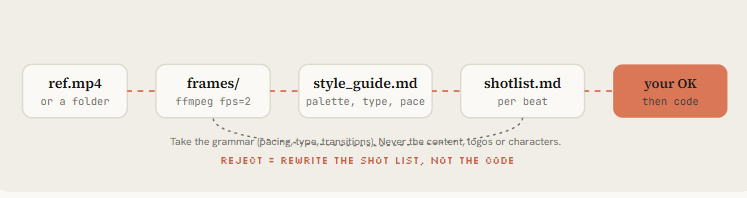
Pleometric suggested p5.js and Opus chose to write its own paper renderer. When you give a reference, let the model pick the technique.
Specify the look and the constraints, not the library, unless you need a specific framework for reuse.
Shows: Why most "one prompt" videos look the same, and the reference + framework + components fix.
"Its TikTok feed" animation, pure code, started from one frame of another viral piece. The single-frame reference in action.
06. Spec - write the state list, not the vibe
The most-bookmarked prompt of the week wasn't a one-liner.
@twoclipping's UI morph (907K views, 19K bookmarks) and @verbove's MakerMap film both used an XML spec: inputs to ask for, direction, a beat-by-beat state list, build rules, and gotchas. NFT_Chen's editor film is the same idea as a story: a fake UI is a set where every element has a known state.
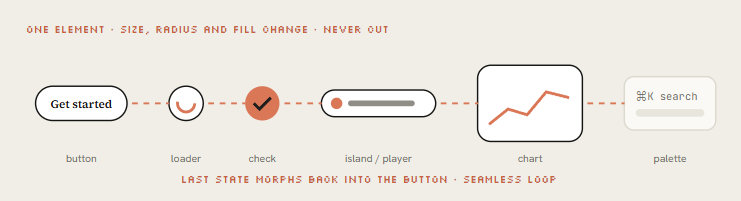
The concept behind them: one shape, never cut. A single element morphs size, radius and color from state to state (button, loader, player, slider, chart, command palette), a cursor drives each change with real clicks, and the last frame equals the first so it loops.
Here is my own template built on that structure; the originals are linked in the resources.
The UI morph loop (907K views) with the open-sourced XML template in the thread. The original of the spec pattern. Put it right after Fig 2.
MakerMap: one shape morphing through the whole product, real data, one HTML file. Shows the same spec applied to a real product.
Opus codes a cartoon video editor and edits inside it: timeline, waveform, export button, all drawn.
UI as a film set, the story version of the spec approach.
• Part 3 · Build the engine
07. Engine - build the seek(t) renderer
This is route A, the one Opus picks by default, written out cleanly. Two files. The page paints any moment on demand, the renderer walks time and pipes frames into ffmpeg.
Prefer a framework? Same prompt, route B
08. Springs - make motion feel expensive
Cheap motion eases from A to B on a fixed curve. Expensive motion has mass: it accelerates, overshoots a hair, settles.
The morph films all specify closed-form springs because they stay a pure function of time, which keeps seek(t) deterministic.
The trick that most people miss: when a value changes target several times (a cursor, a container's width), you don't restart the spring.
You add one spring per change, each starting at its own time. The motion stays continuous, and you can still render frame 812 without simulating frames 0 to 811.
• Snappy UI: buttons, toggles, leading edges
• Default: cards, containers, camera
• Heavy: big type, 3D objects, logo lockups
• Playful: mascots, stickers (visible overshoot)"
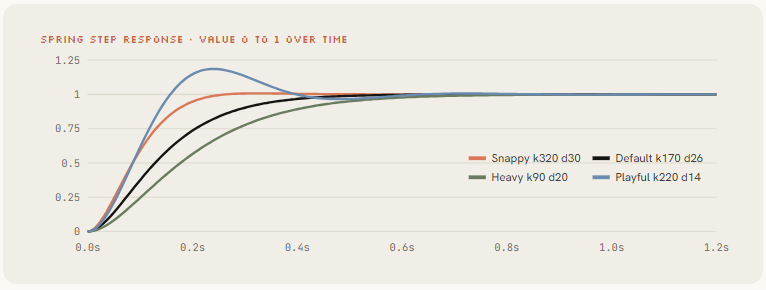
Replace every easing curve with closed-form springs from lib/motion.js. Tiny overshoot on UI, none on type. Any value with more than one target uses track()." Opus refactors the whole file in one pass.
09. Sound - score it to the beat
Rob Hallam thought the audio was added in post. It wasn't.
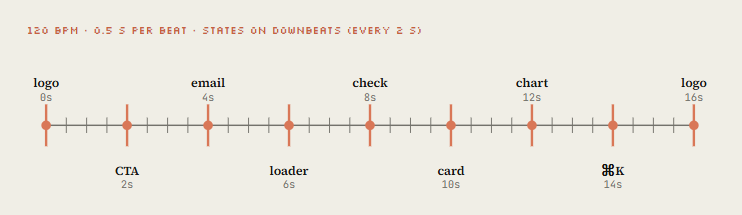
@oozn's Steve Jobs film synthesized its soundtrack in Node with every cut locked to 120 BPM
Vox's "small print" piece synthesized music in Python and then polished the render second by second against it. Sound is where "AI video" starts feeling like a film.
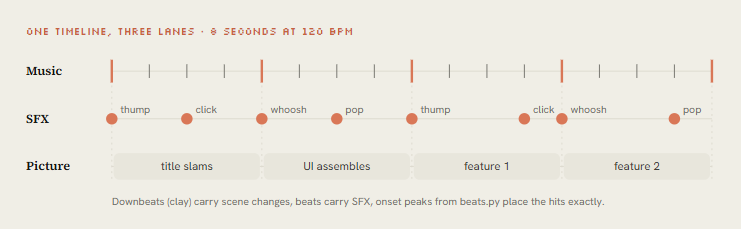
Two paths. If you supply a track, measure it. If you don't, synthesize it on the same timeline as the picture.
Steve Jobs biopic: Remotion + SVG, 23 transitions, soundtrack synthesized in Node, cuts on 120 BPM.
Proof that code-synthesized music can carry a 2-minute film.
"Small print": story, frames and music all by Opus, rendered with HyperFrames. Python-synthesized music, then a second-by-second polish pass.
• Part 4 · From one clip to a studio
10. Overnight - write the director's brief
Donald dictated for five minutes, went to sleep, and woke up to a 142-second music video with 2.1M views.
His public prompt runs about 9,500 characters. @pradeepXkapoor's "Pip" robot film used a 19,000-character brief. Read either and you see the same skeleton: they don't describe a video, they hire a crew.
• Film in one line. The logline and the joke, so every decision can be checked against it.
• References. Source video, song, image library, a GitHub repo of prior work. What to keep, what to push.
• Tools & keys. Skills to load, APIs available (image, video, voice), budget, where docs live. "Spend it economically."
• Character bible. Proportions, palette sampled from a sheet, expressions, an identity lock that survives every style change.
• Beat sheet. Acts with timestamps, a visual payoff every 3 to 5 seconds, a hook in the first 2.
• Text on screen. When lyrics or captions go huge, when they sit like subtitles. Composition leaves room for them.
• Workflow gates. Plan → rig → stills → animatic → full pass → polish → audio → render. Don't skip gates.
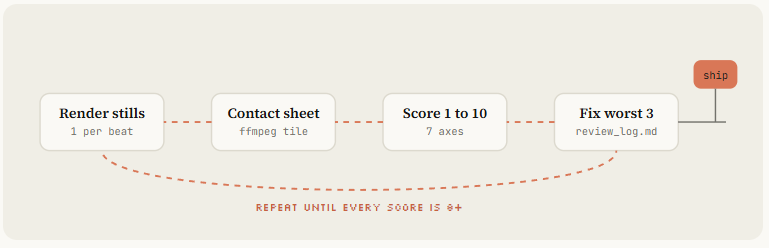
• Critique loop. Render stills, score them, write the 3 worst problems, fix, repeat until every score is 8+.
• Deliverables. Final MP4, loop check, poster frame, contact sheet, clean source with a README
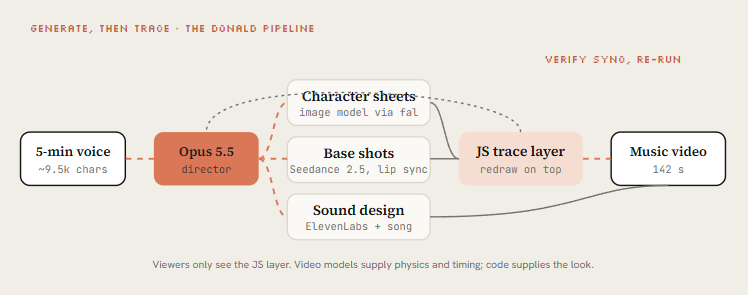
The key move in Donald's brief is generate-then-trace. Seedance 2.5 renders base shots with characters and physics, then Opus redraws the whole video in JavaScript on top, so the viewer only sees the code-drawn layer.
Video models give motion that's hard to hand-code; the JS layer gives a consistent, ownable look. Pleometric re-ran the same brief with his own gallery and got a completely different film.
Spoke to my computer for 5 mins, Claude worked for 12 hours." The Claude Pop music video, 2.1M views. The headline example of L4.
The full ~9,500-character dictated brief. Readers compare it against the director-brief template below.
Donald's brief re-run with a PC-98 gallery; a mixed flow with bugs left in to keep it one-pass.
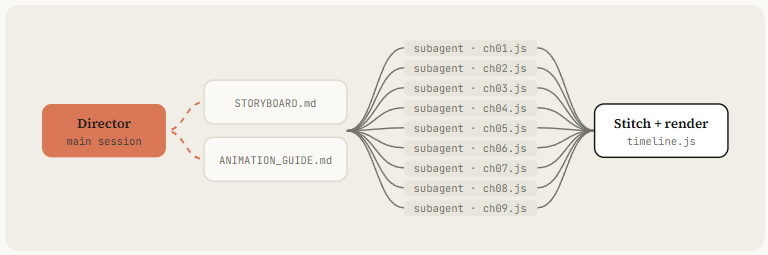
John Heibel's PDoom repo (1.1K stars) shows the subagent pattern for real: Opus wrote ANIMATION_GUIDE.md to brief the subagents it ran in parallel and STORYBOARD.md after the first generation, with nine chapters in src/ch/. Ask for both files by name.
11. Critique - make Opus watch its own frames
Opus 5.5 reads images. That means it can look at what it rendered, and this single habit separates the clips that went viral from the ones posted with "it's a bit mid".
@mablesjoseph's watercolor short was upfront about it: 163 model calls and nearly seven hours, not one shot. Drew's launch-day piece had visible cleanup rounds too. Iteration is the method, not a failure.
Launch-day piece, 1.7M views, with visible cleanup rounds. Iteration is the method. Pair it with the next embed.
Watercolor short, openly not one-shot: 163 model calls, about 6¾ hours. The honest counterweight to "one prompt" claims.
12. Ship - formats, a skill, and a service
Three last moves turn a good clip into a repeatable business. Export every format from one timeline. Package your pipeline as a skill so the next video is a sentence. And, if you want, do what achxvi did the same week: sell it.
Every format from one timeline
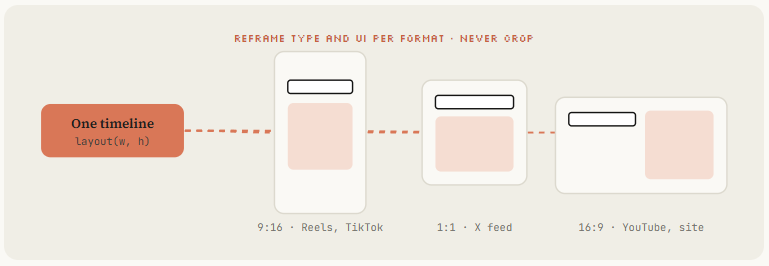
Write the scenes against a layout function, not fixed pixels, and ask Opus to render 9:16, 1:1 and 16:9 in parallel.
The MakerMap spec asked for exactly this. Reframe type and UI per format, don't crop a 16:9 render to vertical.
Package it as a skill
Now the whole course collapses into /motion-reel for [URL], 20s, vertical, reference ./refs/frame.png. Share the skill folder with your team or publish it as a plugin like buildwithhanif did.
Turn it into revenue
achxvi's offer is a good template: music, a mascot in any style, product features, an offer at the end, any language, up to 3 edits.
Tony Dinh's number anchors the price: people paid around $1,000 for this a year ago. A skill plus a critique loop lets you deliver in an afternoon.
38-second vertical product film in 45 minutes, plus the reply offering it as a paid service. The "turn it into revenue" proof. Place directly under this paragraph.
Repos to clone
• Music video: https://github.com/JohnHeibel/PDoomVideo
• Starter: https://github.com/JohnHeibel/ClaudeAnimationBase
• Node canvas: https://github.com/buildwithhanif/claude-animation-skill
• Framework (html): https://github.com/heygen-com/hyperframes
• Framework (react): https://www.remotion.dev/docs/ai/skills
• Long form: https://github.com/WinterArc21/Battle-of-Austerlitz-Film
• Prompt library: https://github.com/guanmo-ai/awesome-ai-motion
• Dataset: https://github.com/athemeroy/awesome-opus-5-5-videos
Conclusion:
The one-liner gets you a clip. The harness gets you a studio.
Install the stack, steal a reference, write the state list, own the seek(t) engine, and make Opus watch its own frames until every score is 8.
Then package it as a skill and never write the long prompt again.
Follow my Substack to get the latest articles on AI, vibe-coding, and agentic systems.